
By Raúl Pérez · Last updated: October 2026 · Reading time: 14 min
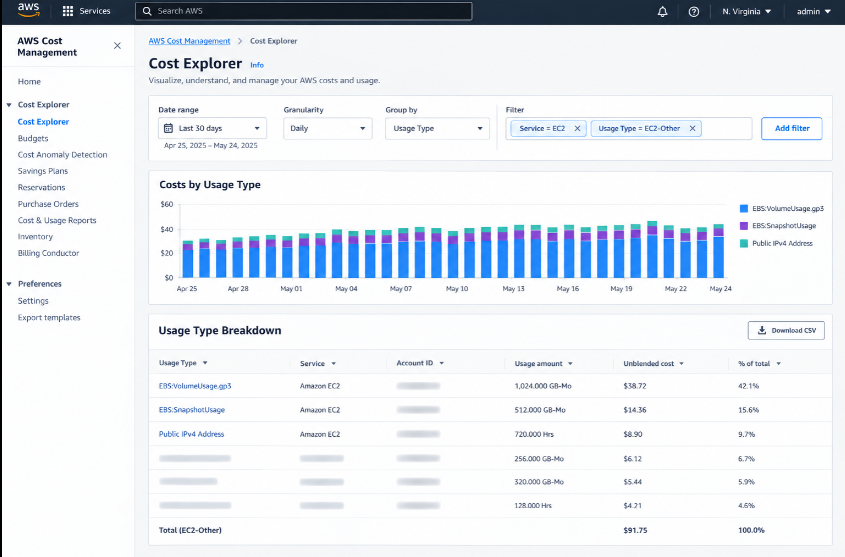
Every AWS account accumulates debris: volumes left behind when an instance was terminated, Elastic IPs nobody released, and snapshots from servers that no longer exist. None of it serves traffic, yet all of it bills every hour.
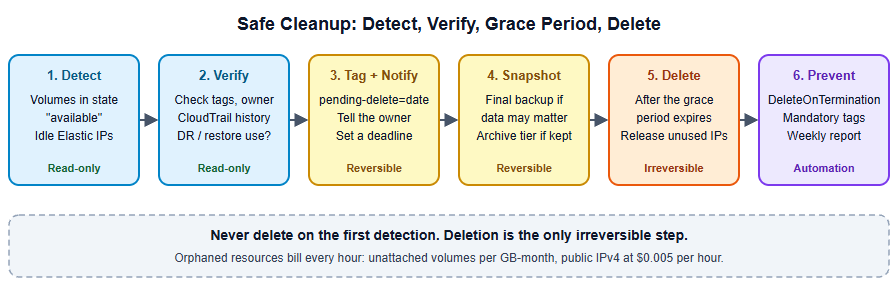
This guide shows how to find that waste, verify it is safe to remove, delete it with a grace period, and stop it from coming back. Every command is read-only until the step where we say otherwise.
Key Takeaways
- Unattached EBS volumes bill the same as attached ones. You pay per GB-month for provisioned size, regardless of use.
- Since February 2024, every public IPv4 address costs $0.005 per hour, attached or idle (about $3.60 per month each).
- Terminating an instance does not always delete its volumes. By default,
DeleteOnTerminationis true only for the root volume. - Never delete on first detection. Tag, notify, wait a grace period, snapshot if in doubt, then delete.
- Prevent recurrence with launch settings, mandatory tags and a weekly report.
Why Orphaned Resources Pile Up
- Instances are terminated, extra volumes are not. AWS deletes the root volume on termination by default, but additional volumes attached to the instance are left behind unless you configured them otherwise.
- Stopped is not free. A stopped instance stops compute charges, but its EBS volumes keep billing.
- Experiments outlive their owners. A proof of concept ends, and nobody owns the leftovers.
- Elastic IPs are easy to forget. They are allocated for a migration or a demo and never released.
- Snapshots accumulate silently. Automated backups with no retention policy grow forever.
What It Costs: An Illustrative Example
| Orphaned resource | Quantity | Monthly cost | Yearly cost |
|---|---|---|---|
| Unattached gp3 volumes (100 GB each) | 25 | 25 x 100 x $0.08 = $200.00 | $2,400 |
| Idle Elastic IPs | 12 | 12 x $3.60 = $43.20 | $518.40 |
| Old standard-tier snapshots | 5,000 GB | 5,000 x $0.05 = $250.00 | $3,000 |
| Total | $493.20 | $5,918.40 |
Individually these are small. Across many accounts and years, they are not. And the first cleanup is usually the largest, because it removes a backlog.
Step 1: Find Unattached EBS Volumes
An unattached volume has the state available. List them in one region:
aws ec2 describe-volumes \
  --region us-east-1 \
  --filters Name=status,Values=available \
  --query 'Volumes[*].{ID:VolumeId,GiB:Size,Type:VolumeType,Created:CreateTime,Name:Tags[?Key==`Name`]|[0].Value}' \
  --output table
Volumes are regional, so repeat the command for every region you use. A quick loop:
for r in $(aws ec2 describe-regions --query 'Regions[].RegionName' --output text); do
  echo "== $r =="
  aws ec2 describe-volumes --region "$r" \
    --filters Name=status,Values=available \
    --query 'Volumes[*].[VolumeId,Size,VolumeType,CreateTime]' --output text
done
Also look at volumes attached to instances that have been stopped for a long time. They are not “available,” but they are just as idle. Often the right move is to snapshot the volume and delete it.
Step 2: Find Idle Elastic IPs
An idle Elastic IP is one with no association:
aws ec2 describe-addresses \
  --region us-east-1 \
  --query 'Addresses[?AssociationId==null].{IP:PublicIp,Allocation:AllocationId}' \
  --output table
Be aware of the bigger picture: since February 2024, AWS charges $0.005 per hour for all public IPv4 addresses, including those attached to running resources such as instances, load balancers and NAT gateways. Idle ones are pure waste, but in-use ones are worth reviewing too. The VPC IP Address Manager has a feature called Public IP Insights that breaks down your usage, and the Cost and Usage Report has a dedicated usage type for idle addresses.
Step 3: Find Stale Snapshots
Snapshots are incremental, so one snapshot’s cost depends on its changed blocks. Start by listing the ones you own, oldest first:
aws ec2 describe-snapshots \
  --owner-ids self \
  --query 'sort_by(Snapshots,&StartTime)[*].{ID:SnapshotId,GiB:VolumeSize,Started:StartTime,Volume:VolumeId,Desc:Description}' \
  --output table
Then look for snapshots whose source volume no longer exists, and snapshots older than your retention policy. Two warnings:
- Snapshots used by an AMI cannot be deleted until you deregister the AMI. Check whether the AMI is still in use before removing it.
- Deleting one snapshot in a chain is safe. AWS keeps the data needed by the remaining snapshots, but check your recovery requirements before cutting retention.
For snapshots you must keep for compliance but rarely need, the Snapshots Archive tier costs $0.0125 per GB-month instead of $0.05, which is up to 75% less. There are trade-offs: a 90-day minimum archive period, early-deletion charges, and a $0.03 per GB restore fee.
aws ec2 modify-snapshot-tier \
  --snapshot-id snap-0123456789abcdef0 \
  --storage-tier archive
Because archived snapshots store a full copy rather than increments, archiving a snapshot that holds little changed data can cost more than leaving it in the standard tier. Archive full, long-lived snapshots, not frequent incremental ones.
Step 4: Verify Before You Touch Anything
This is the step that keeps you out of trouble. For each candidate, ask:
- Who owns it? Check tags (
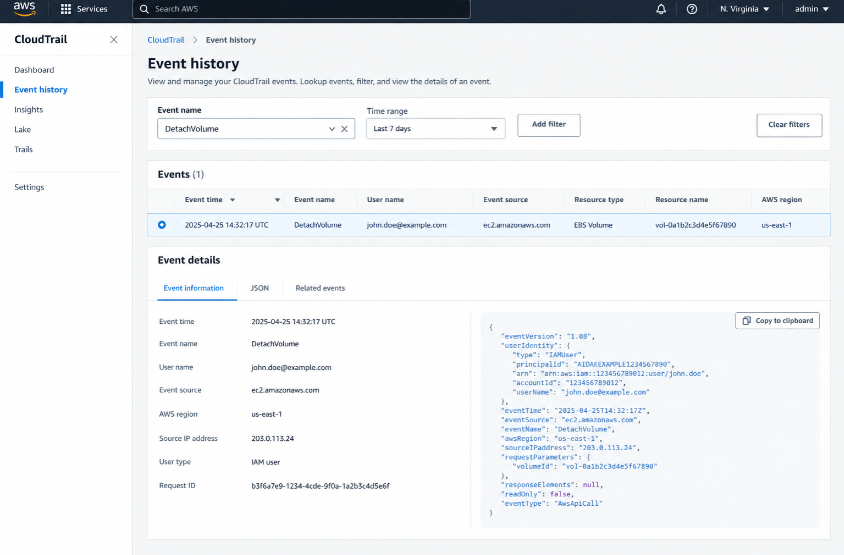
owner,team,project). No tags? Check who created it in CloudTrail (CreateVolume,RunInstances). - When was it last attached? CloudTrail
DetachVolumeevents show it. Volume creation date is not the same as the time it became orphaned. - Is it part of a recovery plan? Some “unused” volumes are deliberate cold standbys.
- Does it hold data nobody else has? If yes, snapshot it before deleting.
Step 5: Clean Up with a Grace Period
The script below never deletes on first detection. On the first run it tags each orphaned volume with the date it was first seen. Only if the volume is still unattached after the grace period does it snapshot and delete it. It runs in dry-run mode by default.
import boto3
import datetime as dt

REGION = "us-east-1"
GRACE_DAYS = 14
DRY_RUN = True  # set to False only after reviewing the output

ec2 = boto3.client("ec2", region_name=REGION)
today = dt.datetime.now(dt.timezone.utc).date()

def tags_of(resource):
    return {t["Key"]: t["Value"] for t in resource.get("Tags", [])}

# --- Volumes ---
paginator = ec2.get_paginator("describe_volumes")
for page in paginator.paginate(Filters=[{"Name": "status", "Values": ["available"]}]):
    for vol in page["Volumes"]:
        vid, tags = vol["VolumeId"], tags_of(vol)

        if tags.get("keep") == "true":
            continue

        first_seen = tags.get("orphan-first-seen")
        if not first_seen:
            print(f"[NEW]    {vid} {vol['Size']} GiB: tagging as first seen")
            if not DRY_RUN:
                ec2.create_tags(Resources=[vid],
                                Tags=[{"Key": "orphan-first-seen", "Value": str(today)}])
            continue

        age = (today - dt.date.fromisoformat(first_seen)).days
        if age < GRACE_DAYS:
            print(f"[WAIT]   {vid} orphaned for {age} days")
            continue

        print(f"[DELETE] {vid} orphaned for {age} days")
        if not DRY_RUN:
            snap = ec2.create_snapshot(
                VolumeId=vid,
                Description=f"Final backup before cleanup of {vid}",
                TagSpecifications=[{"ResourceType": "snapshot",
                                    "Tags": [{"Key": "cleanup-backup", "Value": "true"}]}],
            )
            ec2.get_waiter("snapshot_completed").wait(SnapshotIds=[snap["SnapshotId"]])
            ec2.delete_volume(VolumeId=vid)

# --- Elastic IPs (report only) ---
for addr in ec2.describe_addresses()["Addresses"]:
    if "AssociationId" not in addr:
        print(f"[IDLE EIP] {addr['PublicIp']} ({addr['AllocationId']}): review, then release")
Release an Elastic IP you have confirmed is unused:
aws ec2 release-address --allocation-id eipalloc-0123456789abcdef0Run the script weekly. The first run only tags. The second run, after the grace period, is the first one that can delete anything. Give owners a way to opt out by adding the tag keep=true.
Step 6: Prevent It from Coming Back
Cleanup without prevention is a treadmill. Put these controls in place:
- Set
DeleteOnTerminationto true for non-root volumes that should not outlive the instance. Do it in your launch templates and infrastructure code. - Require tags (
owner,team,expires) on every resource, and enforce them with tag policies or a Config rule. - Automate snapshot retention with Amazon Data Lifecycle Manager, so backups expire by policy rather than by hand.
- Run the report weekly and send it to the owning teams, not only to FinOps.
- Alert on idle IPv4 usage in Cost Explorer or Budgets so a forgotten IP does not run for a year.
- Shut down non-production at night. Stopped resources still pay for EBS, so scheduling only helps if you also remove what you do not need. See our guide to automating resource shutdown in AWS.
Cleanup Checklist
| Resource | How to find it | Safe action | Risk |
|---|---|---|---|
| Unattached volume | status=available | Tag, wait, snapshot, delete | Low if verified |
| Volume on long-stopped instance | Stopped instances report | Snapshot, then delete | Medium |
| Idle Elastic IP | No AssociationId | Review, then release | Low |
| Snapshot of deleted volume | Source volume missing | Delete per retention | Low to medium |
| Snapshot used by an AMI | AMI references it | Deregister AMI first | Medium |
| Long-term snapshot | Compliance retention | Move to Archive tier | Low |
Common Mistakes
- Deleting on first sight. Always use a grace period and a final snapshot when data may matter.
- Trusting volume creation date. It does not tell you when the volume became orphaned.
- Forgetting other regions. Waste hides in regions nobody uses.
- Archiving the wrong snapshots. Archive costs full-size storage and has a 90-day minimum.
- Cleaning once. Without prevention, the backlog returns within months.
- Skipping owners. A cleanup that surprises teams loses trust, and the next one gets blocked.
Final Thoughts
Orphaned EBS volumes and idle IPs are among the safest savings in AWS, because they serve no traffic. The risk is not in the technique but in the process: verify ownership, use a grace period, keep a final snapshot when in doubt, and automate the weekly check. Once the backlog is gone, move on to the larger levers in our guide to reducing AWS EC2 costs, and decide how to commit with Reserved Instances vs Savings Plans.
FAQ
Do unattached EBS volumes really cost the same as attached ones? Yes. EBS bills for provisioned storage per GB-month, regardless of whether the volume is attached or in use.
Does terminating an EC2 instance delete its volumes? Only the root volume, by default. Additional volumes persist unless DeleteOnTermination is set to true for them.
Are idle Elastic IPs charged differently from in-use ones? No. Since February 2024, both are charged at $0.005 per hour. In-use IPs used to be free.
Is it safe to delete old snapshots? Usually, if no AMI uses them and they are outside your retention requirements. Deleting an older snapshot does not break newer ones, because AWS preserves the data they depend on.
Should I archive or delete old snapshots? Delete what you do not need. Archive what you must keep for 90 days or more and rarely restore.