
By Raúl Pérez · Last updated: October 2026 · Reading time: 12 min
If you run steady workloads on AWS, paying On-Demand rates leaves money on the table. AWS offers two commitment-based discount models: Reserved Instances (RIs) and Savings Plans (SPs). Both trade a 1- or 3-year commitment for a lower price, but they work very differently, and the wrong choice can lock you into paying for capacity you no longer use.
In 2026, most teams are better served by Savings Plans for compute, yet RIs still make sense in specific cases. This guide explains the differences, the real risks, the exact exit rules, and a practical decision framework.
Key Takeaways
- Savings Plans commit you to a dollar amount per hour. RIs commit you to a specific configuration.
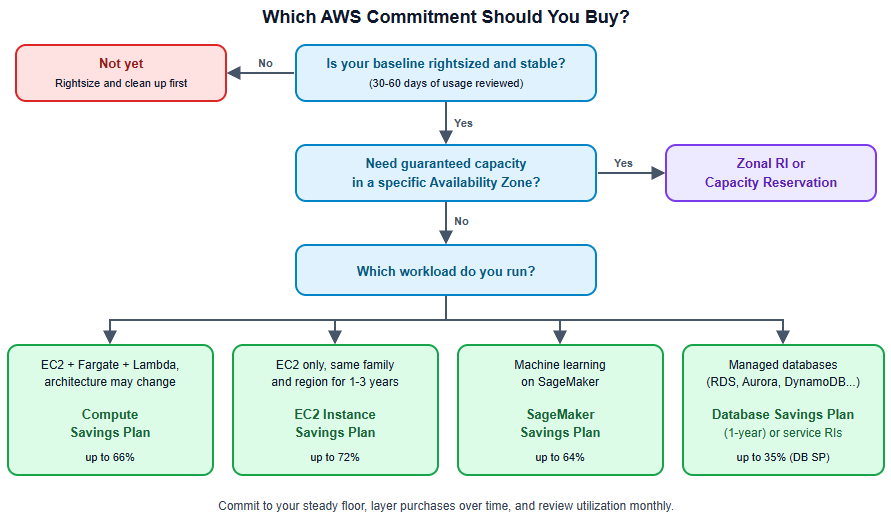
- Compute Savings Plans are the best default for changing architectures (EC2, Fargate and Lambda). EC2 Instance Savings Plans give a deeper discount if you know your instance family and region.
- Only zonal RIs reserve capacity. Savings Plans never do.
- Exit options differ. Standard RIs can be resold. Savings Plans can only be returned within a narrow window.
- Optimize first, commit second. A fixed commitment does not shrink when your usage does.
The Short Answer
- Choose Savings Plans if you want flexibility, run containers or serverless, or expect your instance types, regions or architectures to change.
- Choose Reserved Instances if you need a capacity reservation in a specific Availability Zone, use services where an RI is the better fit, or want the option to resell Standard RIs.
- Most organizations use a mix, with Savings Plans as the base and RIs for the gaps.
What Are Reserved Instances?
A Reserved Instance is a billing discount (not a physical instance) applied to matching usage. You commit to a configuration: instance family, size or size flexibility, platform (operating system), tenancy and region (or Availability Zone).
Types:
- Standard RIs: the highest discount, up to roughly 72% off On-Demand, with limited ability to change attributes.
- Convertible RIs: a lower discount (up to roughly 66%), but you can exchange them for other Convertible RIs of equal or greater value.
Scope:
- Regional RIs apply across the region and give you size flexibility within an instance family for Linux, but they do not reserve capacity.
- Zonal RIs reserve capacity in one Availability Zone, which matters for disaster recovery or planned launches, but with less flexibility.
Payment options: All Upfront, Partial Upfront or No Upfront. More upfront payment means a larger discount.
RIs also exist for other services, such as Amazon RDS and Amazon ElastiCache, with their own rules.
What Are Savings Plans?
Instead of committing to an instance configuration, you commit to a dollar amount of usage per hour (for example, $10 per hour) for 1 or 3 years. Usage up to that commitment is billed at the discounted rate. Anything above it is billed at On-Demand rates.
AWS currently offers four types:
| Plan | Max discount (AWS-stated) | What it covers |
|---|---|---|
| Compute Savings Plans | Up to 66% | EC2 in any family, size, region, OS or tenancy, plus Fargate and Lambda |
| EC2 Instance Savings Plans | Up to 72% | EC2 in one chosen instance family and region. Flexible on size, OS and tenancy |
| SageMaker AI Savings Plans | Up to 64% | SageMaker instance usage across families, sizes and regions |
| Database Savings Plans | Up to 35% | Aurora, RDS, DynamoDB, ElastiCache, DocumentDB, Timestream, Neptune, Keyspaces and DMS. 1-year term |
Both Compute and EC2 Instance plans also apply to EC2 instances that run inside EMR, EKS and ECS clusters, which is why they matter for container-heavy teams.
Database Savings Plans are the newest addition. AWS community guidance indicates they apply to newer instance generations only, so confirm eligibility for your engines and instance types on the official page before buying.
Head-to-Head Comparison
| Feature | Reserved Instances | Savings Plans |
|---|---|---|
| Commitment model | Specific configuration | Dollars per hour |
| Max discount | Up to 72% (Standard) | Up to 72% (EC2 Instance SP) |
| Flexibility | Low to medium | Medium to high |
| Covers Fargate and Lambda | No | Yes (Compute SP) |
| Capacity reservation | Yes (zonal RIs) | No |
| Resell on marketplace | Yes, Standard EC2 RIs only | No |
| Exchange or modify | Convertible can be exchanged | Not exchangeable, but Compute SP adapts automatically |
| Return after purchase | No | Limited, 7-day window |
| Management effort | Higher | Lower |
| Databases | RDS, ElastiCache and others have their own RIs | Database Savings Plans (1-year) |
Key Differences That Actually Matter
1. Flexibility vs. Capacity
Savings Plans adapt as your architecture evolves. Migrate from m5 to m7g Graviton, move from EC2 to Fargate, or shift regions, and a Compute Savings Plan keeps applying. An RI tied to the old configuration might sit unused.
On the other hand, only zonal RIs reserve capacity. If you must guarantee that instances are available in a specific Availability Zone, use zonal RIs or On-Demand Capacity Reservations.
2. The Over-Commitment Trap
Both models are use-it-or-lose-it. With Savings Plans, if your hourly usage falls below the commitment, you still pay the full committed amount. With RIs, unused reservations are wasted unless you resell them.
Savings Plans reduce the risk of unused coverage because they apply to a broader pool of usage. But they carry a different risk: a fixed commitment does not shrink when you optimize your infrastructure. That is why you should rightsize before you commit. Our guide on reducing AWS EC2 costs without hurting performance shows the order of operations, and cleaning up orphaned resources first is covered in eliminating unattached EBS volumes and idle IPs.
3. Exit Options (Verified Rules)
Savings Plans can be returned only in a narrow window. Per AWS documentation, a plan is eligible if:
- its hourly commitment is $100 or less,
- it was purchased within the last 7 days,
- the return happens in the same calendar month (UTC), and
- you have not hit the limit of 10 returns per calendar year per management account.
A successful return refunds 100% of any upfront charge. All Upfront or Partial Upfront plans registered under AWS Brazil or AWS Turkey are excluded. After the window, you cannot cancel, resize, exchange or sell a Savings Plan.
Because of the same-month rule, avoid buying in the last week of a month: your correction window shrinks. The return can also be done from the CLI (check the current syntax in the AWS CLI reference):
aws savingsplans return-savings-plan --savings-plan-id <your-savings-plan-id>Standard RIs can be resold on the Reserved Instance Marketplace, with conditions:
- Only Standard EC2 RIs qualify. Convertible RIs cannot be sold.
- RIs for other services, such as RDS and ElastiCache, cannot be sold there.
- The RI must have been active for at least 30 days and have at least one month left in its term.
- AWS charges a 12% service fee on the total upfront price.
- RIs bought with a volume discount cannot be sold.
- Once sold, the instances that used it are billed at On-Demand rates.
If exit flexibility is a priority, this is a real point in favor of Standard RIs, but remember that resale is not guaranteed.
4. Operational Overhead
Managing RIs means tracking expirations, matching attributes, and exchanging or reselling them. Savings Plans are simpler: one hourly commitment, applied automatically. For small DevOps teams, that reduced overhead has real value.
How Discounts Are Applied
AWS applies commitment discounts automatically, generally in this order: Reserved Instances first, then EC2 Instance Savings Plans, then Compute Savings Plans. Within Savings Plans, usage with the highest discount rate is covered first. This is why mixing both works: RIs cover specific usage, and Savings Plans catch the rest.
Worked Example: Same Baseline, Different Outcomes
Assumptions (illustrative only): a stable EC2 fleet whose steady baseline is $12,000 per month at On-Demand prices. We assume a 28% Compute Savings Plan discount. Your real discount depends on region, term, payment option and instance family, so replace it with the figure from your Cost Explorer recommendation.
Step 1: convert the baseline to an hourly figure. $12,000 / 730 hours is about $16.44 per hour at On-Demand prices.
Step 2: remember that the commitment is in discounted dollars. At a 28% discount you would commit roughly $16.44 x 0.72, or about $11.84 per hour. Many teams get this wrong and commit the On-Demand figure.
Step 3: calculate the savings. You would pay about $8,640 per month for usage that used to cost $12,000. That saves about $3,360 per month, or $40,320 per year.
Step 4: see what happens if you optimize afterwards. Suppose rightsizing then cuts that baseline by 25%, to $9,000 at On-Demand prices. At the same discount it consumes only about $6,480 of your $8,640 commitment. Utilization falls to 75%, and you pay roughly $2,160 per month for nothing.
The lesson is simple: the savings from rightsizing and the savings from a commitment are not additive if you do them in the wrong order.
Comparing strategies for this fleet:
- Option A: Standard RIs. Higher potential discount, but locked to specific types. If the team migrates to Graviton in six months, part of the commitment may go unused (though Standard EC2 RIs can be resold).
- Option B: Compute Savings Plan. A lower ceiling than Standard RIs, but it follows the workload through a Graviton migration and any later move to containers.
- Option C: Hybrid. Compute SP for most of the baseline, plus a zonal RI or a Capacity Reservation for a business-critical cluster that needs guaranteed capacity.
For most growing teams, Option B or C is the safest path.
How to Size a Savings Plan Without Over-Committing
- Clean up first. Rightsize and remove waste so you commit to real, needed usage.
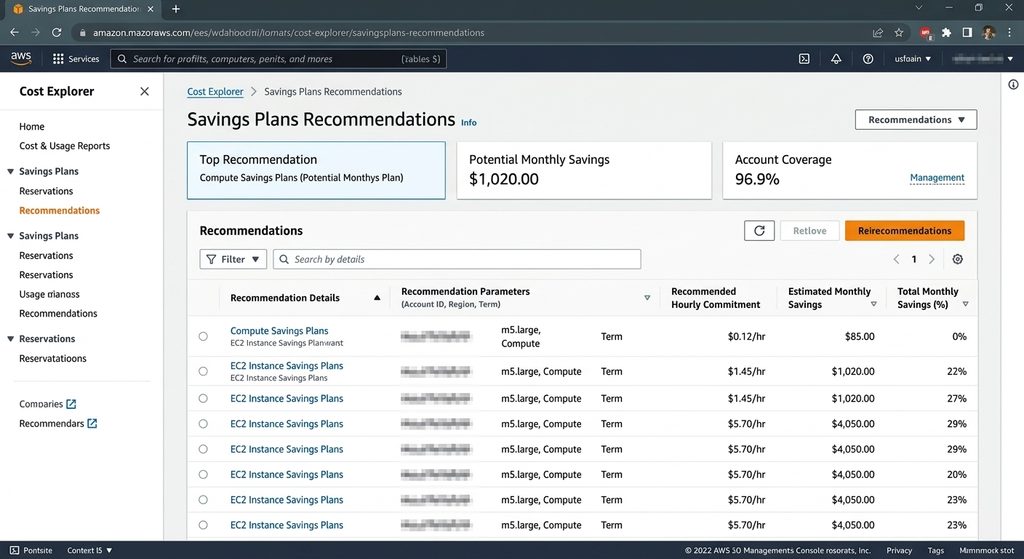
- Look at the baseline. In Cost Explorer’s Savings Plans recommendations, check the 30- or 60-day lookback.
- Commit to the floor, not the average. A good starting point is your minimum steady hourly spend.
- Layer purchases. Buy in smaller increments every few months (laddering) instead of one big purchase. This also spreads your expiry dates.
- Buy early in the month, so the 7-day return window stays usable.
- Track coverage and utilization monthly. Aim for utilization close to 100% and a coverage level you are comfortable with.
Fetch recommendations from the CLI:
aws ce get-savings-plans-purchase-recommendation \
  --savings-plans-type COMPUTE_SP \
  --term-in-years ONE_YEAR \
  --payment-option NO_UPFRONT \
  --lookback-period-in-days THIRTY_DAYS
And monitor utilization:
aws ce get-savings-plans-utilization \
  --time-period Start=2026-09-01,End=2026-10-01
Which Should You Choose? A Decision Framework
| Your situation | Recommendation |
|---|---|
| Fast-changing architecture, containers, Lambda | Compute Savings Plan |
| Stable fleet, same family and region for 1 to 3 years | EC2 Instance Savings Plan (deeper discount) |
| Need guaranteed capacity in an Availability Zone | Zonal RI or Capacity Reservation |
| Managed databases (RDS, Aurora, DynamoDB, ElastiCache) | Database Savings Plan (1-year) or the service’s RIs. Compare both quotes |
| Want an exit route for unused commitments | Standard EC2 RIs (resale) or Convertible RIs (exchange) |
| Small team, low admin time | Compute Savings Plan |
| ML workloads on SageMaker | SageMaker AI Savings Plan |
| Usage still being optimized | Wait. Rightsize first, then buy a small first layer |
Common Mistakes
- Committing before rightsizing. You lock in discounts on waste, as the worked example shows.
- Committing the On-Demand amount. Savings Plan commitments are measured in discounted dollars per hour.
- Going all-in on 3-year, all-upfront. The discount is larger, but so is the risk. Many teams start with 1-year terms.
- Buying at month-end. You lose most of the return window.
- Ignoring coverage gaps. Uncovered usage keeps billing at On-Demand rates.
- Forgetting renewal dates. Expiring commitments cause sudden cost spikes.
- Not assigning an owner. Commitment management should belong to a FinOps lead or platform team.
Final Verdict for 2026
For most organizations, Compute Savings Plans are the better default. They deliver strong discounts, absorb architectural change and take less effort to manage. Choose EC2 Instance Savings Plans when you are confident about your instance family and region, and keep Reserved Instances for capacity guarantees, resale flexibility and services where they remain the better fit. For managed databases, request a quote for both Database Savings Plans and RIs.
The best strategy is never “RI or SP” in isolation. Rightsize first, cover your stable baseline with a layered Savings Plan approach, and use RIs for the specific cases where they excel. If you have not rightsized yet, start with our guide to reducing AWS EC2 costs.
FAQ
Do Savings Plans replace Reserved Instances? Not entirely. They overlap for EC2, but RIs still offer capacity reservations and marketplace resale for Standard EC2 RIs, and some services keep their own RIs.
Can I use both at the same time? Yes. AWS applies RIs first, then Savings Plans to the remaining eligible usage.
What happens if I over-commit to a Savings Plan? You pay the committed hourly amount even if usage drops. Start conservative, layer purchases, and use the 7-day return window if you spot an error immediately.
Can I cancel a Savings Plan? Not after the return window. You can return an eligible plan only within 7 days of purchase and in the same calendar month, and only if its commitment is $100 per hour or less.
Is a 1-year or 3-year term better? The 3-year term gives a bigger discount, but 1-year is lower risk if your architecture or cloud strategy may change.
Do Savings Plans cover Fargate and Lambda? Yes, Compute Savings Plans do. EC2 Instance Savings Plans cover EC2 only.